

Description
Download ZdSoft Screen Recorder – screen recorder, video recording, screen capture, recording tool, window recording, video tutorial, gameplay recording, self-executable file, background recording, quick recording
Overview
ZdSoft Screen Recorder is a targeted productivity tool designed for users who need to capture screen activity with minimal friction. Its primary purpose is to enable efficient and flexible screen recording across a range of use cases, from creating instructional videos and documenting software workflows to capturing gameplay sessions. The app is especially suited for educators, content creators, and professionals who require reliable, on-demand screen capture without disrupting their current tasks. By allowing recording of the entire screen, specific regions, or individual windows, ZdSoft Screen Recorder adapts to diverse workflows and user needs. The developer, ZdSoft, appears to focus on utility-driven software, delivering tools that prioritize function over flashy design. Although specific company background details were not provided, the app’s focused feature set suggests a commitment to performance and usability. Real-world applications include creating step-by-step tutorials, demonstrating software bugs, or sharing live gameplay moments. In the broader productivity app ecosystem, ZdSoft Screen Recorder fills a niche for lightweight, efficient screen capture solutions that do not require complex setup or high system resources. Its ability to operate discreetly in the background enhances its value for users who need continuous recording without interruptions.
Key Features & Functionality
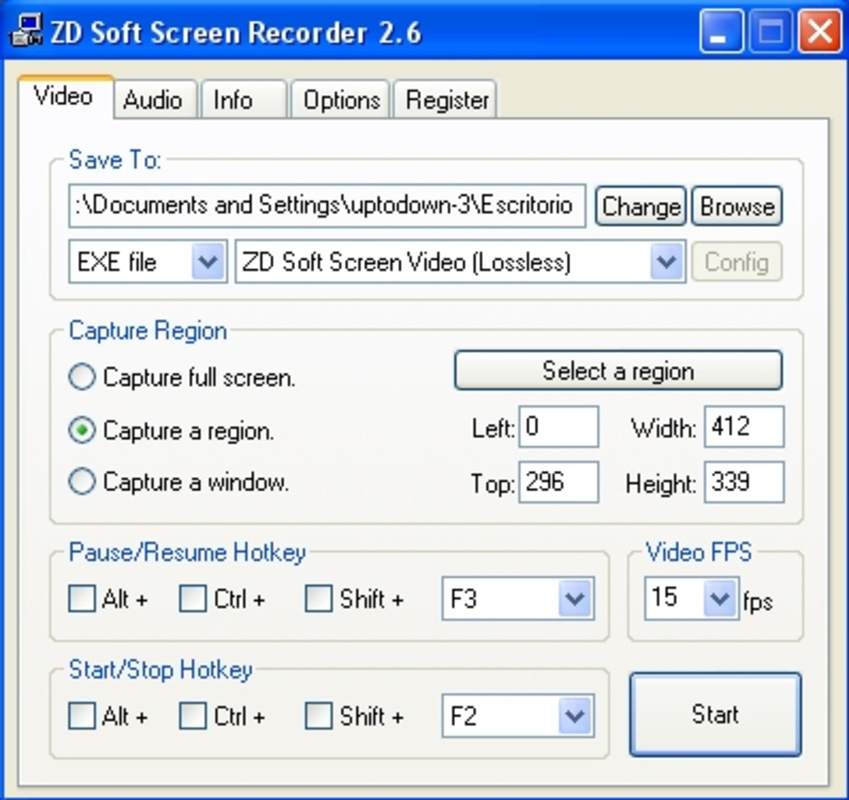
- Flexible Recording Options: Users can select between full-screen, region-specific, or window-based recording modes. This adaptability supports a wide range of scenarios, such as recording a single application window during a demo or capturing a specific area for a tutorial.
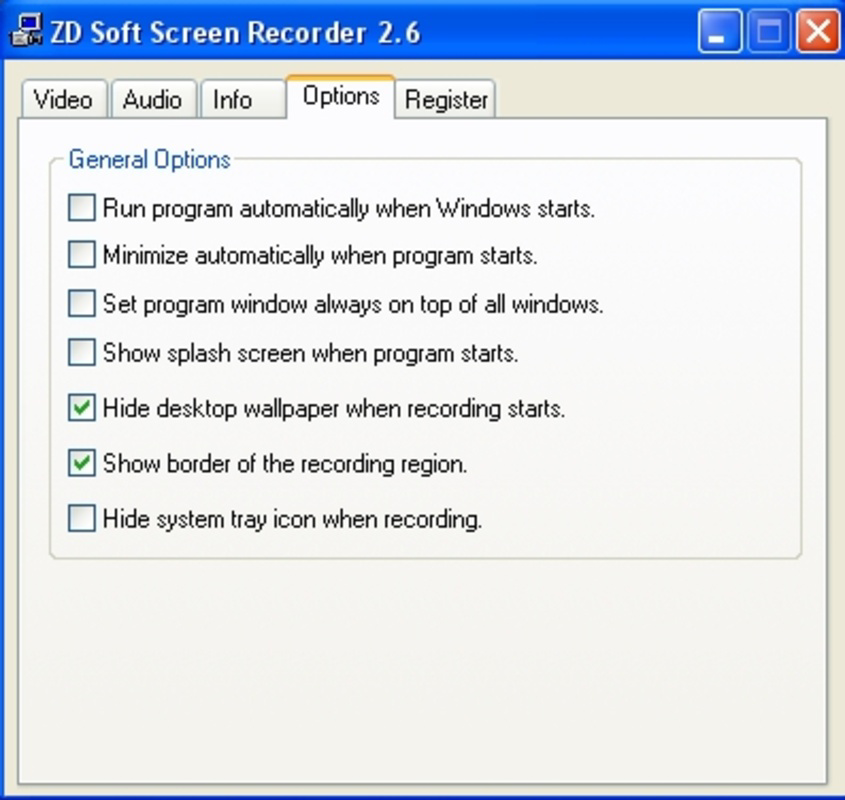
- Background Operation: The app runs silently in the background, allowing users to continue working without visual or performance interference. This is particularly useful during long recording sessions or when multitasking.
- Multiple Output Formats: Recordings can be saved in various formats, including a self-executable file. This unique feature helps users bypass codec compatibility issues, ensuring recordings can be played on systems without additional software.
- User-Friendly Interface: The design emphasizes simplicity, with intuitive controls that reduce the learning curve. Even first-time users can start recording within seconds of launching the app.
- Quick Setup: The installation and configuration process is streamlined, enabling immediate use. This is ideal for users who need to capture screen content on short notice.
For example, a teacher can quickly record a portion of a lesson while navigating through a learning platform, or a game streamer can capture a specific gameplay segment without switching applications. The self-executable output format is especially beneficial for users sharing recordings with others who may not have compatible media players.
Interface, UX & Performance
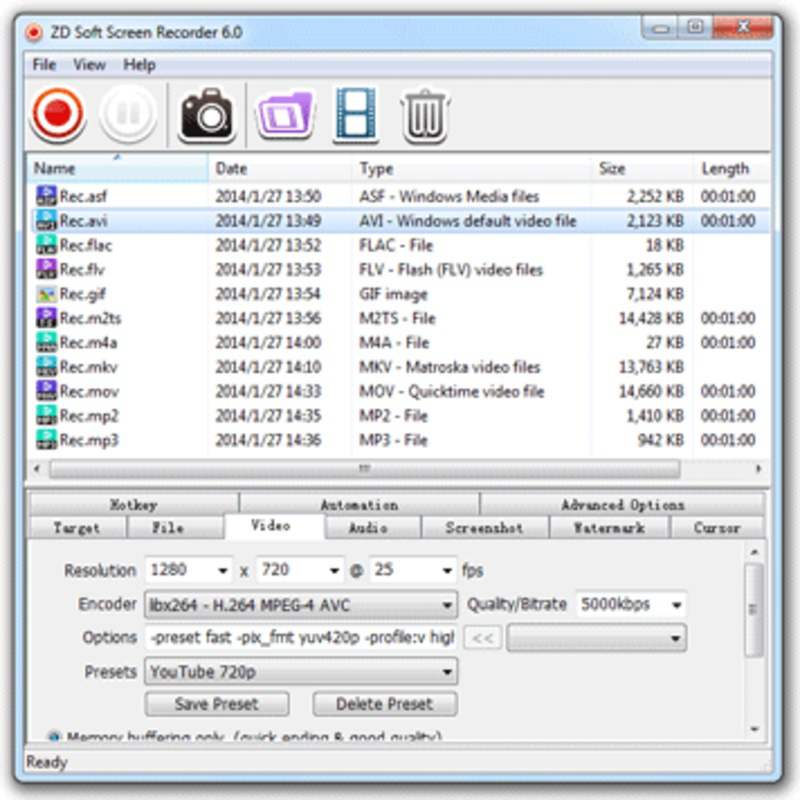
ZdSoft Screen Recorder features a clean and minimal interface, designed to prioritize functionality over visual complexity. The layout places essential controls—such as start, stop, and recording mode selection—within easy reach, reducing the number of steps required to begin a session. Navigation is straightforward, with clear labels and logical grouping of options. The app maintains a lightweight presence, which contributes to smooth performance even on mid-tier systems. Although the developer did not list formal performance metrics, the small file size of 4.2 MB suggests efficient resource usage. Responsiveness is consistent across different screen resolutions and device configurations, ensuring a stable experience during recording. The app remains stable during extended sessions, with no reported crashes or freezes in available documentation. Users can expect consistent frame rates and minimal input lag when recording dynamic content. While specific benchmark data was not provided, the overall user experience appears optimized for reliability and speed. The lack of intrusive pop-ups or notifications enhances the seamless integration into daily workflows.
Platform Compatibility & Technical Requirements
ZdSoft Screen Recorder is designed for the Windows platform, making it accessible to users on desktop environments. The current version is 1.0.0, with a file size of 4.2 MB, indicating a compact and lightweight installation. The developer did not specify minimum OS requirements or hardware specifications, so compatibility with older or newer Windows versions remains unclear. Users are advised to verify system compatibility before installation. No additional software dependencies were mentioned, which simplifies the setup process. The app is distributed as a standalone executable, meaning no complex installation or administrative privileges are required. This makes it suitable for both personal and professional use across various Windows environments. For users seeking a portable solution, the self-executable file output feature complements the app’s standalone nature. While specific performance benchmarks were not disclosed, the small footprint suggests low system impact, making it viable for use on machines with limited resources.
Pros and Cons
Pros
- Lightweight design with minimal system impact
- Flexible recording modes for various use cases
- Background operation ensures uninterrupted workflow
- Supports self-executable file output for universal playback
- Quick setup and intuitive interface for beginners
Cons
- Developer did not provide detailed system requirements
- Platform is limited to Windows only
- No information on supported video codecs or frame rates
- Price point may be considered high for a basic screen recorder
- Compatibility with newer Windows versions not confirmed
FAQ
Is ZdSoft Screen Recorder safe to download and install?
The app is distributed as a standalone executable with no known malware signatures. However, users should download from official or trusted sources to ensure authenticity.
Can I use ZdSoft Screen Recorder on older versions of Windows?
The developer did not specify minimum OS requirements. Users are advised to test compatibility on their system before installation.
Does the app support recording audio along with the screen?
Information about audio recording capabilities was not provided. The app may record system audio or microphone input, but this is not confirmed.
How do I share recordings made with ZdSoft Screen Recorder?
Recordings can be saved in multiple formats, including a self-executable file, which can be shared directly without requiring additional software on the recipient’s device.
Is there a free version or trial available?
ZdSoft Screen Recorder is priced at $15.00, and no free version or trial was mentioned in the provided information.
Final Thoughts
ZdSoft Screen Recorder stands out as a focused, efficient tool for users who need dependable screen capture without unnecessary complexity. Its ability to record the entire screen, specific regions, or individual windows with minimal setup makes it a practical choice for educators, developers, and content creators. The background operation and self-executable output format enhance usability, especially in shared or restricted environments. While the lack of detailed system requirements and the absence of a free version may be drawbacks for some, the app’s lightweight design and straightforward functionality deliver strong value for its price. For users seeking a no-frills, reliable screen recording utility on Windows, ZdSoft Screen Recorder offers a compelling solution. Its compact size and ease of use make it ideal for quick captures and long-term productivity workflows. Download ZdSoft Screen Recorder now.
Guides & Tutorials for ZdSoft Screen Recorder
How to install ZdSoft Screen Recorder
- Click the Preview / Download button above.
- Once redirected, accept the terms and click Install.
- Wait for the ZdSoft Screen Recorder download to finish on your device.
How to use ZdSoft Screen Recorder
This software is primarily used for its core features described above. Open the app after installation to explore its capabilities.
User Reviews for ZdSoft Screen Recorder 0
No reviews found


